How it works

The whole pipeline, from specification to maintenance

Model One carries a data-warehouse delivery from the first concept model through technical design and a generated dbt project to years of maintenance. Each stage builds on the one before, in the same model, so the build traces back to the specification.

Model One generates the DDL, migrations and dbt project. Your team runs them.

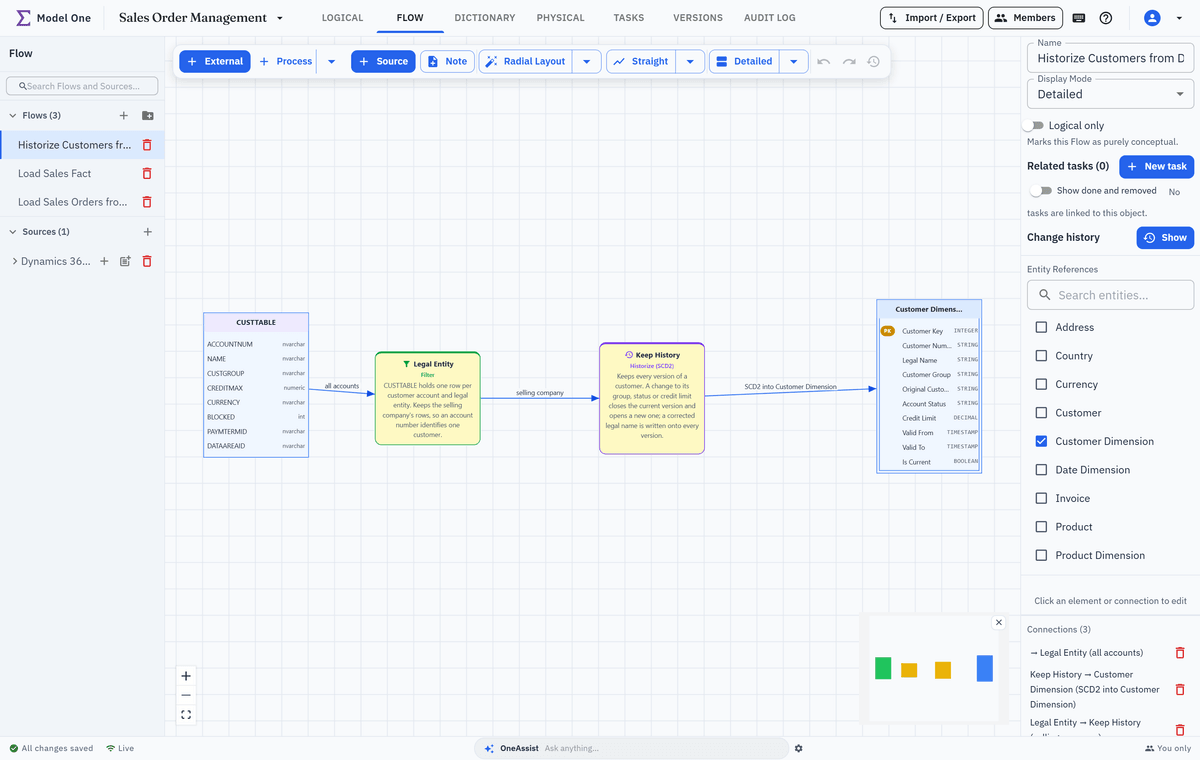
The Flow Historize Customers from D365 in Model One: the CUSTTABLE source object passes a Legal Entity filter and a Keep History step (Historize, SCD2) into the Customer Dimension, whose columns include Valid From, Valid To and Is Current
Why one model

One connected model instead of a relay of documents

Specification, design and build usually live in different files. In Model One they are one model.

A warehouse delivery usually runs as a relay: a glossary in one document, a concept diagram in another, a mapping spreadsheet, then DDL and load code written by hand. Every hand-off is a copy. After the first change request, nobody is sure which copy is right.

In Model One every phase adds to the same model. Concepts stand for subject areas of the logical model. Flows map real source columns to real entity attributes. Physical models, DDL, migrations and the dbt project are generated from those same definitions. Change an attribute once and the Flows, the next DDL and the next dbt export all read the new definition.

That makes Model One the specification and design layer of your delivery. It generates what your engineers build and run: DDL, migration scripts, a dbt project and graph schema files. It does not run loads, it never connects to your databases, and it does not build reports or BI semantic models. A section further down shows exactly where it stops.

Stage by stage

What you do in each stage

Each stage says what happens in Model One, what it produces and who usually works there. The module pages go deeper.

Specification · Stage 1

Agree concepts and vocabulary

Start where the business starts: with its concepts and its words. Draw the concept model on the Full Model view, name the connections between concepts, and define each term in the Data Dictionary. Requirements and open questions become work items linked to the concepts and terms they concern, so the specification and its backlog stay together.

  • Concepts with definitions, drawn before the entities that realise them exist
  • Named, hand-drawn connections between concepts, each with its own definition
  • Data Dictionary terms with business definitions, datatypes and approved abbreviations
  • Report requirements and open questions as work items linked to concepts, terms and entities
  • Business owners review as Viewers in the app; the HTML report carries the glossary, logical model and Flows, not the concept map

Concept model

Logical model and dictionary

Tasks

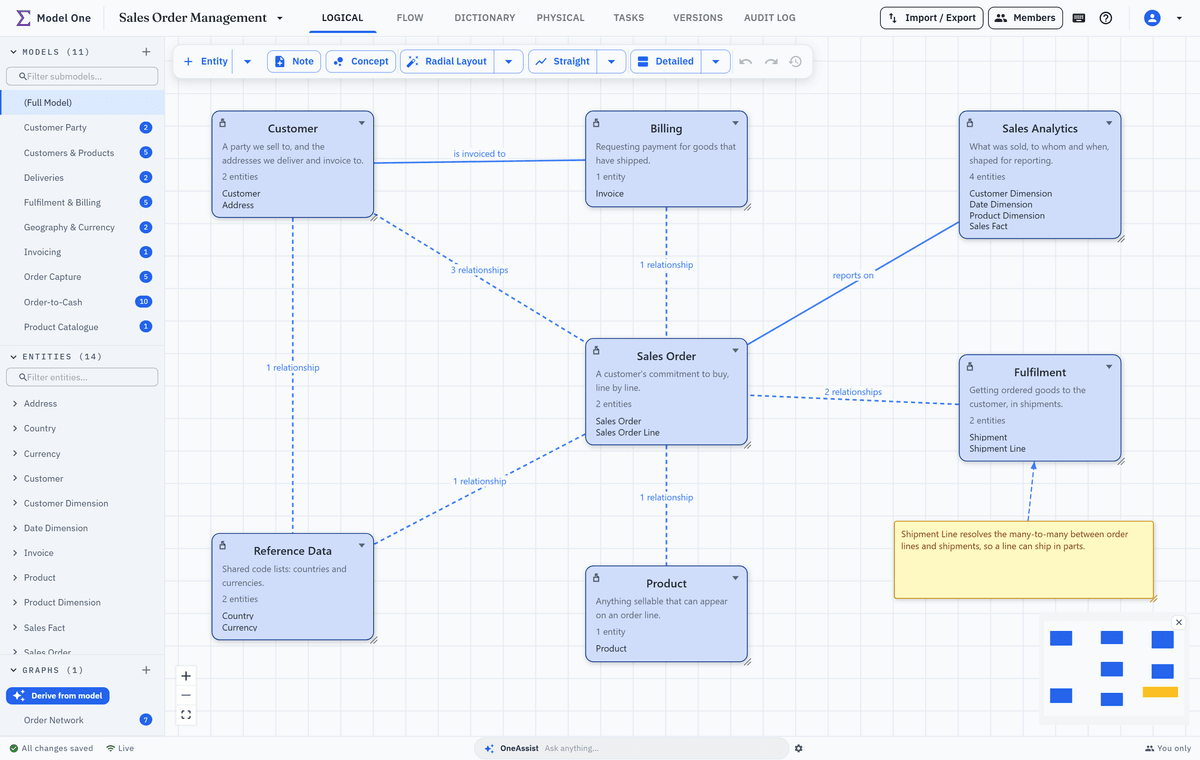
Full Model as a concept map: seven concepts, among them Customer, Sales Order, Billing and Sales Analytics, with their definitions and entity counts, joined by dashed derived lines and two named lines, is invoiced to and reports on
Specification · Stage 2

Design the logical target model

Turn the concepts into the logical model the warehouse will hold. Each concept stands for a subject area, a submodel, so the business view stays readable while the detail grows beneath it. Business keys, surrogate keys and relationships are decided here, once. A star schema is modelled the same way: its fact and dimensions are ordinary entities, and a dimension's Valid from, Valid to and Is current are ordinary attributes.

  • Primary and alternate keys, natural or surrogate (auto-increment or UUID), plus indexes
  • Relationships create their foreign-key columns, with cardinality and ON DELETE / ON UPDATE actions
  • Subject areas as nestable submodels, each with its own diagram and layout
  • Template entities for recurring column sets, such as audit columns
  • Graph models bound to the same entities, where a graph target is needed

Logical model

Graph models

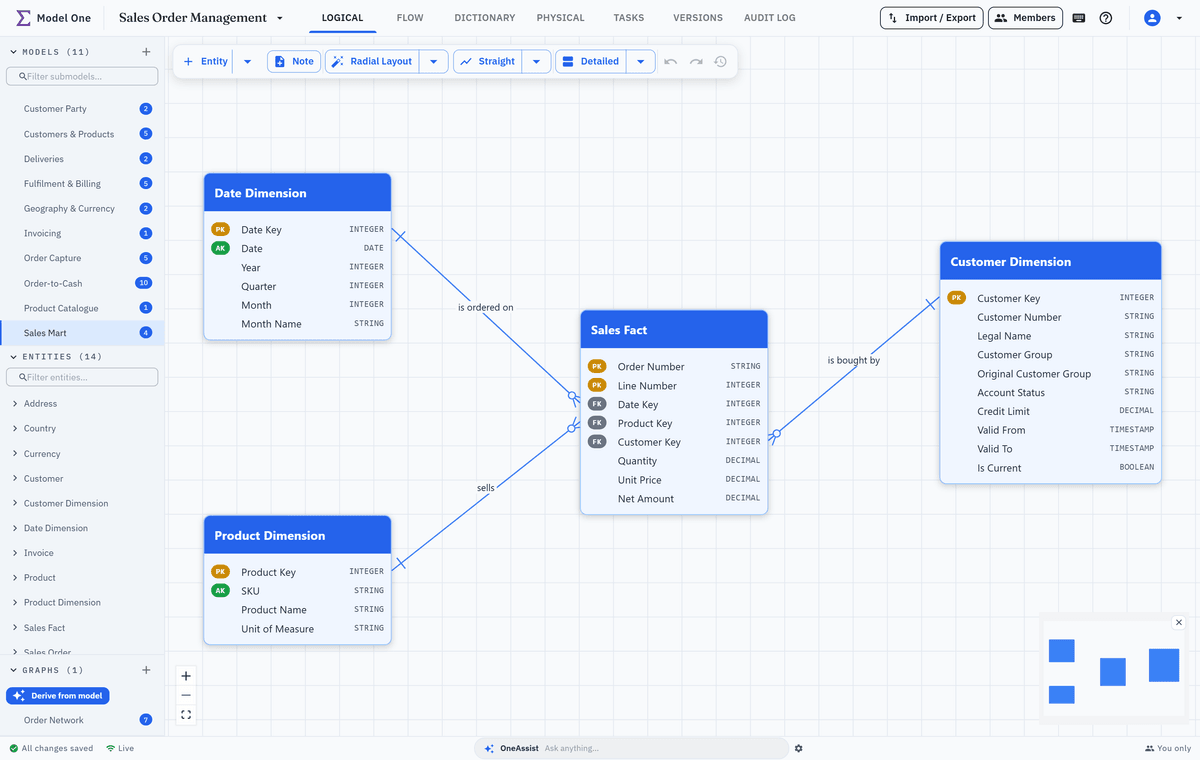
The Sales Mart submodel on the logical canvas: a Sales Fact joined to Date, Product and Customer dimensions, each entity with its keys and typed attributes
Technical design · Stage 3

Map sources to targets in Flow

Record each source system and bring in its tables and columns by pasting their DDL or entering them by hand. Then design each load as a Flow: source objects pass through typed steps such as Join, Lookup, Merge or Historize into the target entities, with column-level mappings into the target attributes; a fact load, for example, resolves each dimension key with a Lookup. Model One checks the diagram as you draw and says plainly whether it can be exported.

  • SQL Server and file sources alike, with tables and columns from pasted DDL or entered by hand
  • 22 process types, from Lookup, Join and Aggregate to Merge, Hash and Validate
  • Historize (SCD2): business key, history mode per column, validity columns, delete policy
  • Column-level mappings with expressions, auto-map by name and chaining across steps
  • Rules checked as you draw; when something needs attention, a band says whether the Flow can still be exported

Flow

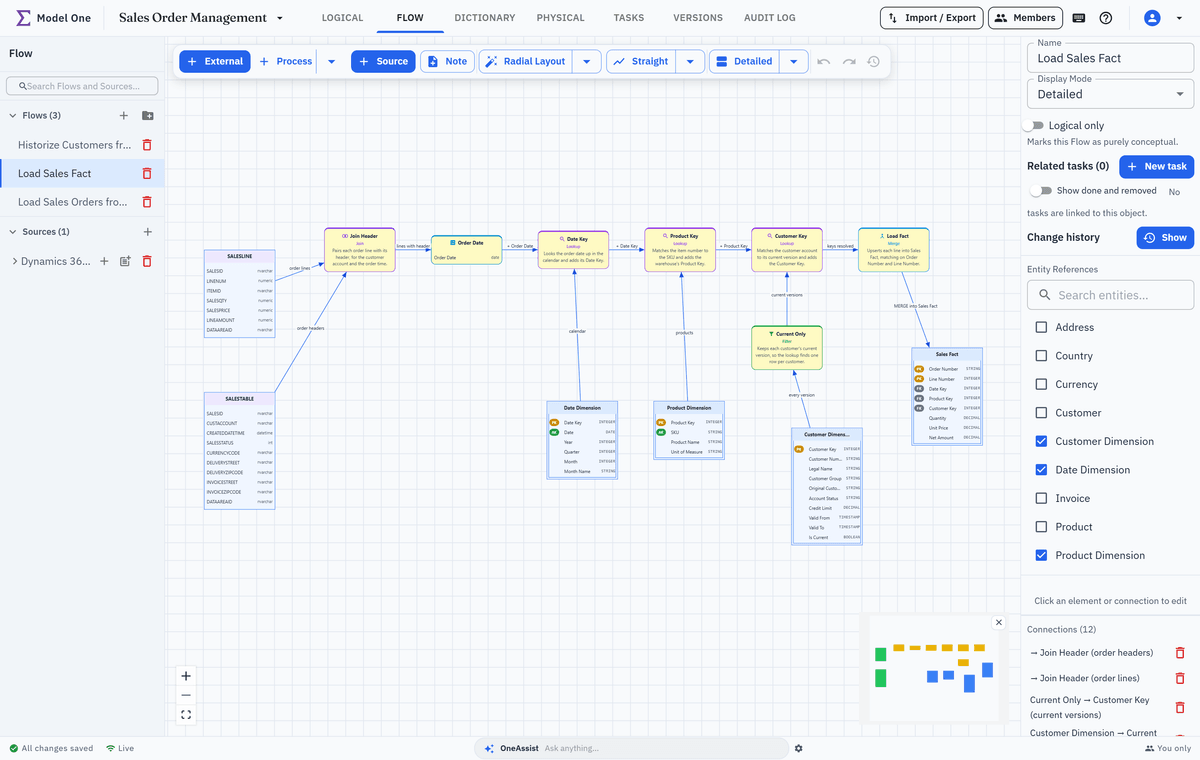
The Flow Load Sales Fact: SALESLINE joined to its SALESTABLE header, an Order Date step, and Lookups for the date, product and customer keys, the customer one against a Current Only filter over Customer Dimension, merged into Sales Fact
Technical design · Stage 4

Design the physical model for your platform

Derive a physical model for each target database from the same logical model. Fabric Data Warehouse is a target of its own, so Model One generates what the warehouse actually accepts and reports what it cannot carry. A naming standard and the pre-deployment checks catch problems before anyone runs a script.

  • Targets: Microsoft Fabric Data Warehouse, SQL Server, PostgreSQL, Oracle and MySQL
  • Naming standard per model: off, monitor or enforced, with approved abbreviations
  • Table, schema and column overrides, surrogate strategies and excluded tables
  • Indexes, CHECK constraints, referential actions and custom SQL where the target allows
  • Checks for what the database would reject, such as mismatched FK types or long names

Physical model

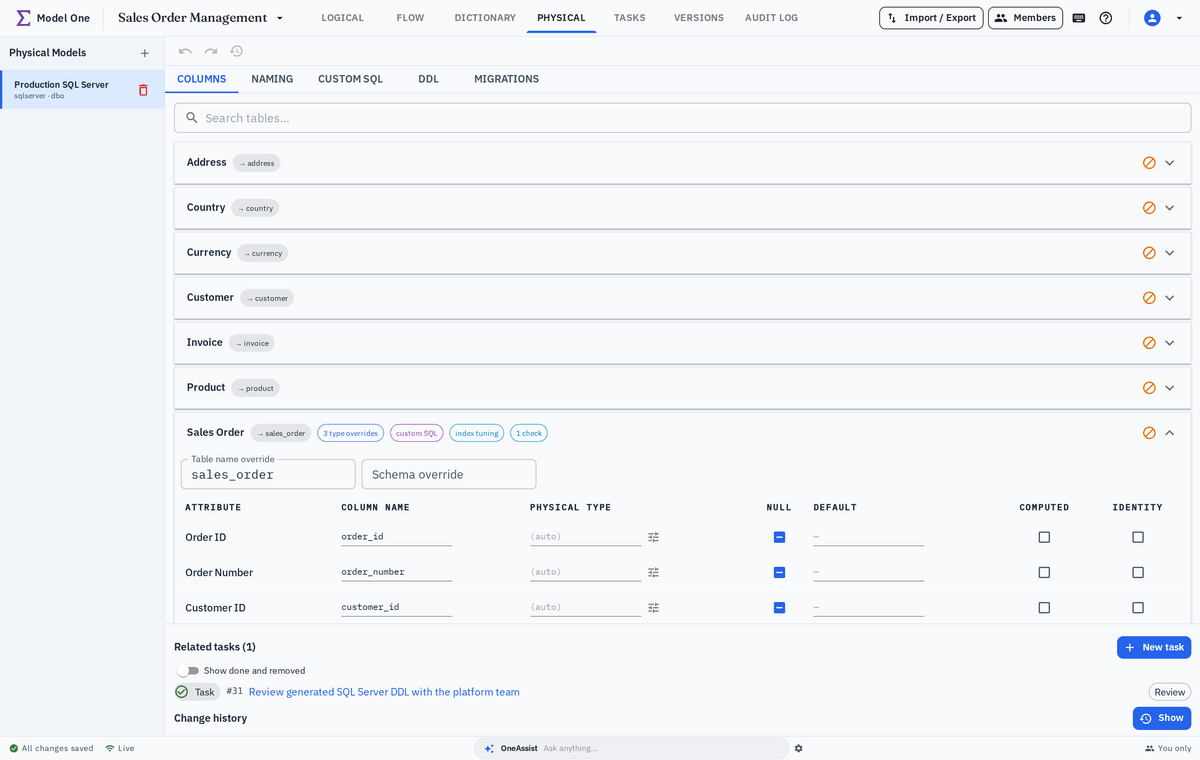
The Columns tab of a physical model: Sales Order expanded with its table-name override sales_order, a grid of its columns and types, and summary chips
Implementation · Stage 5

Generate the build

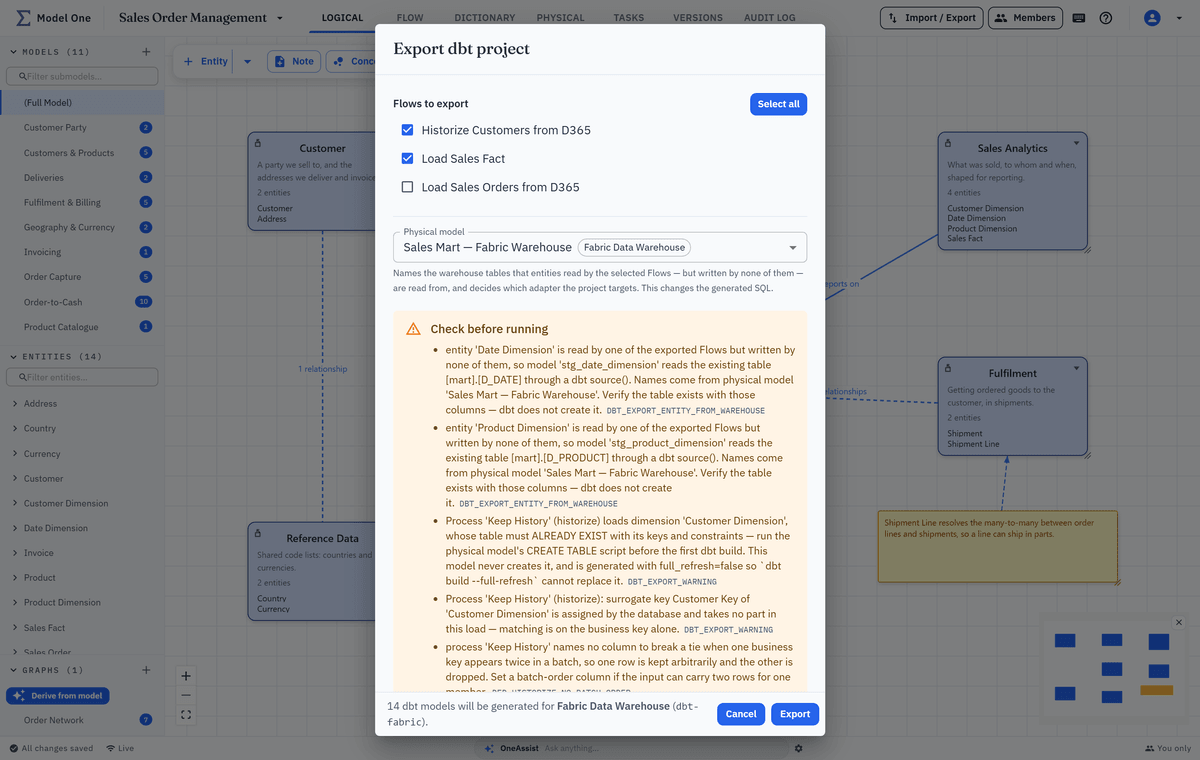
Generate the DDL that creates the warehouse tables, and export the Flows as one runnable dbt project for dbt-fabric or dbt-sqlserver, chosen by the physical model. The export dialog checks your selection on the server as you make it, lists what to check before running the project, and blocks the download while a selected Flow has an error. Your engineers review the output and commit it to your own repository.

  • DDL per target, for the whole model or one table, with every identifier quoted
  • A dbt project with staging, intermediate and marts layers, sources.yml and a README of TODOs
  • Bundled MERGE and SCD2 incremental strategies; not_null and unique tests from the keys
  • Dimension and fact Flows assemble into one project that builds in dependency order
  • Graph exports as GraphML, SQL/PGQ, Neo4j Cypher or a Microsoft Fabric graph model

Flow and dbt export

Physical model

Graph models

The Export dbt project dialog: the customer dimension and sales fact Flows ticked, the Sales Mart — Fabric Warehouse model setting a dbt-fabric target, and the list of what to check before running the project
Implementation · Stage 6

Deploy changes to a live warehouse

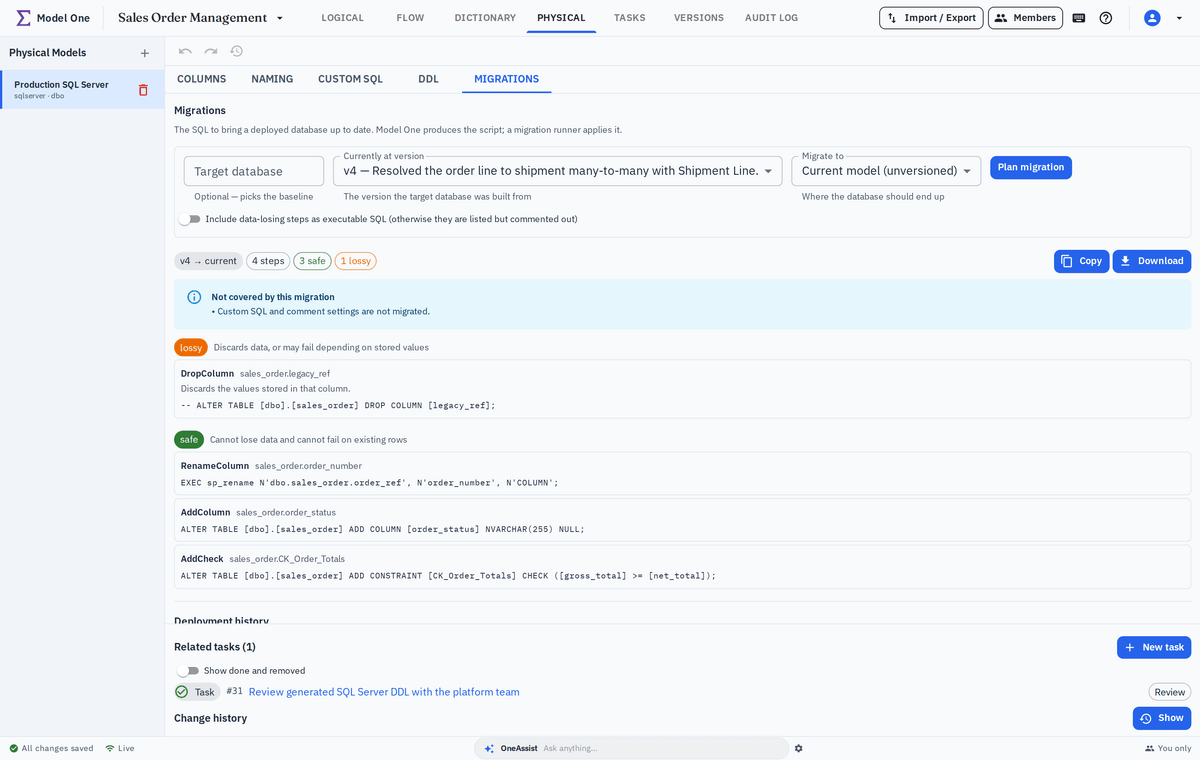
Once a warehouse holds data, a CREATE script is the wrong tool. A migration plans the ALTER statements from the version a database runs to the current model, and the deployment history records which version each environment runs. You read the script and run it with your own tools: Model One never connects to the database.

  • Deployment history: which version each environment runs, when it was applied and by whom
  • Migrations from that baseline to a later version or to the current model
  • Every step labelled safe, lossy or blocking; risky steps commented out until you confirm
  • Renames stay renames: tables and columns keep their data, and a renamed column keeps its keys
  • Changed custom SQL shown side by side, and included only when you tick it

Physical model and migrations

Versions and audit

The Migrations tab: a plan from v4 to the current model in five steps, four safe and one lossy, with the lossy drop of a column commented out with its reason and the new tables ready to create
Maintenance · Stage 7

Maintain and evolve the warehouse

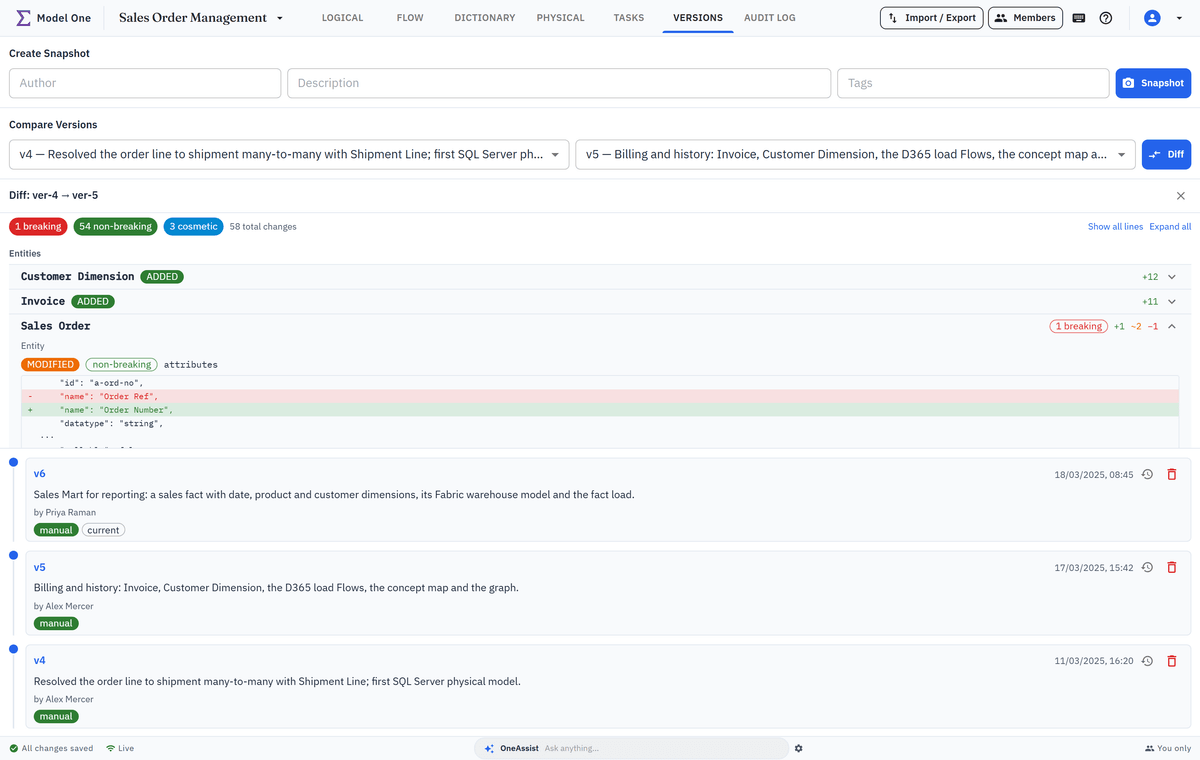
A warehouse lives for years, and every change request starts with the same questions: what does this touch, and who changed it last? Tagged versions and classified diffs show what changed between releases, the audit log shows who changed what, and an entity's Used in tab shows where it is used before you change it.

  • Tagged versions of the model, Flows and physical models; compare any two, restore selected objects
  • Diffs classified as breaking, non-breaking or cosmetic, so a release review starts with risk
  • Field-level audit log of who changed what and when, marking changes made via the assistant
  • An entity's Used in tab lists the submodels, Flows and dictionary terms that use it
  • Change requests as work items linked to the objects they change, with dependencies

Versions and audit

Tasks

Versions v4 and v5 compared: tallies of breaking, non-breaking and cosmetic changes, an Entities heading with each changed entity on its own row and Sales Order's renamed attribute shown before and after, and the version list, newest v6 first, below
Summary

Stages, outputs and people

The whole pipeline in one table, to share with the rest of the team.

StageWhat you getWho works here
1. Agree concepts and vocabularyConcept map, business glossary, backlog of linked requirementsBusiness owner, data architect, BI lead
2. Design the logical target modelLogical target model, subject-area submodels, graph models where neededData architect, data modeler
3. Map sources to targets in FlowSource catalogue, load designs as Flows, source-to-target mappingsData architect, data engineer
4. Design the physical model for your platformPhysical model per target database, naming standard, deployment checksData architect, data engineer, DBA
5. Generate the buildDDL scripts, a runnable dbt project (.zip), graph schema filesData engineer, analytics engineer
6. Deploy changes to a live warehouseMigration scripts, deployment history per environmentData engineer, DBA or platform team
7. Maintain and evolve the warehouseTagged versions, classified diffs, audit trail, linked change requestsWhole delivery team; business owners follow as Viewers
Scope

Where Model One starts and stops

Model One designs and generates. Your databases, your pipeline and your BI tool do the rest.

It designs the warehouse and marts that reports read

Dimensions with full history, facts, Aggregate steps for summary tables and the merge loads that fill them are all designed and generated here. That is the layer your reports query.

Flow

The semantic model and reports stay in your BI tool

Model One does not build Power BI semantic models, measures or reports. Build them in your BI tool on top of the marts Model One generated.

Report requirements and consumers are documented in the model

Write each measure's business definition as a Data Dictionary term and link it to the mart attributes it is built on. Add the report or BI tool to a Flow as an external system reading from the mart, or describe the path in a Logical-only Flow, which is kept out of the dbt export. Record report requirements as work items linked to the mart entities and Flows, so a change request finds them from the entity's Used in and Related tasks.

It never connects to your databases

Model One reads no rows and stores no database credentials. Sources are documented from pasted DDL or by hand, and DDL, migrations and the dbt project are files your team runs.

Your pipeline runs the loads

The dbt project is a .zip you commit to your own repository or import into Microsoft Fabric, then run, schedule and monitor with your own tooling.

dbt projects are T-SQL only

The dbt export produces dbt-fabric or dbt-sqlserver projects, chosen by the physical model. PostgreSQL, Oracle and MySQL are supported for DDL and migrations, not as dbt targets.

Your stack

How it fits the tools you already run

Model One runs in your own Azure subscription and hands its output to the tools your team already uses.

Runs in your Azure subscription

Installed from Azure Marketplace as a managed application, in the region you choose. Your models are stored in your subscription, and its Azure resources are billed there.

Plans and pricing

Microsoft Fabric and SQL Server first

Fabric Data Warehouse and SQL Server get DDL, migrations and dbt projects. PostgreSQL, Oracle and MySQL get DDL and migrations.

Physical model

dbt in your own Git and CI

The export is an ordinary dbt project for dbt 1.10 or newer. Commit it to your repository and build it in your CI pipeline like any other dbt code.

Flow and dbt export

Bring your existing models

Import ER/Studio DM1 files, including submodels, data sources and Data Lineage diagrams, or start from SQL DDL, DBML or a Model One JSON export.

Your own AI agents, over MCP

Each project has an MCP endpoint, so an agent you run yourself, such as Azure AI Foundry, a desktop AI client or your own code, can read and change it with a project token only an Owner can fetch. Its changes are recorded in the audit log and are not undoable.

OneAssist and MCP

OneAssist, if you want it

The built-in assistant runs on Azure AI Foundry in your subscription, once an administrator sets it up. Ask and Plan modes only read; Agent mode applies changes directly, audited but not undoable. Viewers never see it.

OneAssist

FAQ

Questions data-warehouse leads ask us

Short, honest answers. We are happy to go deeper in a walkthrough.

Does Model One connect to our databases?

No. It never connects to a source system or a warehouse and stores no database credentials. It produces DDL, migration scripts and a dbt project, and your team runs them with its own tools.

Is the concept model a separate model?

No, and that is deliberate. A concept is a business-level view over the logical model: it stands for a subject area, is drawn on the Full Model view, and its dashed lines are computed from the relationships beneath it, so they cannot drift from the entities. Concepts carry a name, a definition and named connections, not attributes or cardinality. If your concept model is finer-grained, with business concepts joined by relationships and their cardinalities, draw those concepts as entities in a subject-area submodel and show that submodel in Name + Definition mode. The diagram then shows names, definitions and relationships without attributes or datatypes, and the same entities get their attributes and keys during technical design.

What about the reporting layer and Power BI?

Model One designs and generates the warehouse and the marts your reports read, including SCD2 dimensions and Aggregate steps. It does not build Power BI semantic models, measures or reports: those stay in your BI tool. You can still document a report or BI tool in a Flow as an external system.

We already run a warehouse and model it in ER/Studio. Where do we start?

Import your ER/Studio DM1 files, which bring entities, keys, submodels, physical names and types, data sources and Data Lineage diagrams, or paste the warehouse's DDL to build a logical and a physical model with native types. Save that as a version and record it as what production runs, and the next change can ship as a migration.

Does it handle SCD2 and Data Vault?

With building blocks, not a generator. Historize loads type-2 dimensions, or insert-only satellites, from a business key and a history mode per column, and Hash builds hub and link keys and change hashes. You model the hubs, links and satellites yourself; these steps load them.

How does the dbt project fit our CI pipeline?

It is a plain dbt project for dbt-fabric or dbt-sqlserver, downloaded as a .zip with a README listing what to review. Commit it to your repository and run it from your CI like any dbt project. When the model changes, export again: the export always regenerates the whole project from the current model, so the change arrives as an ordinary diff in your repository, and Merge loads add new columns to their existing target tables on their own. Tables whose keys the database assigns, and every Historize target, must be created from the generated DDL before the first dbt build.

Can business owners take part without editing?

Yes. Give them the Viewer role: they can read every module, the concept map included, and export an HTML report, but cannot change anything. The HTML report opens in any modern browser, so people without an account can read it too; it carries the logical model, Flows, dictionary and DDL, but not the concept map, which is reviewed in the app.

Where does our data live, and is it sent anywhere?

Model One is installed in your own Azure subscription, in the region you choose, and stores what you model, never the rows in your databases. OneAssist is optional: once it is set up, prompts and model context are processed by Azure AI Foundry in your subscription. Its web search, which queries the public web, is on by default and can be switched off only when the agent is created.

Walk your own warehouse through the pipeline

Bring a real scenario, such as a dimension that keeps history or a source system you load today. We will take it from concept model to a generated dbt project and a migration script.