Concept modeling

Concept modeling on the same model your team builds

Start with the business concepts and the statements that join them, before any entity exists. Link each concept to the submodel that realises it, and Full Model then draws the concepts in place of their entities, with dashed lines computed from the relationships between them.

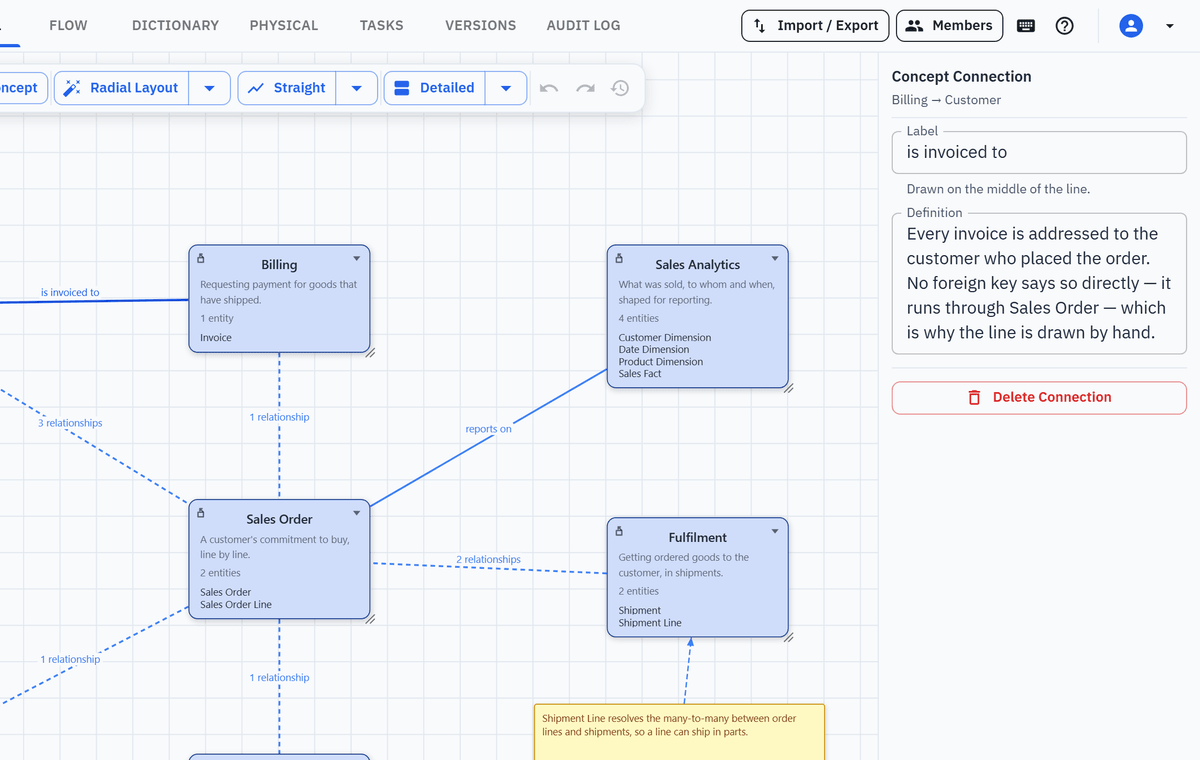
Full Model as a concept map: Customer, Product, Sales Order, Fulfilment, Billing, Reference Data and Sales Analytics with definitions and entity counts, dashed derived lines and two solid lines labelled is invoiced to and reports on
Overview

What a concept is in Model One

A business-level box that stands for one submodel of the logical model.

A concept is a business-level box with a name, a definition, a note and a colour. It stands for one submodel of the logical model. On the Full Model view Model One draws the concept in place of the entities it covers, so a model of 200 entities reads as a dozen named ideas. Nothing is moved or copied: the entities, their relationships and every physical model stay exactly as they are.

You can work concept-first. A new concept stands for nothing until you link it, so a specification workshop can lay out the concepts, their definitions and the named connections between them before any entity exists. When the subject area has been modeled, point the concept at the submodel that realises it.

Lines between concepts come in two kinds. A dashed line is derived: it appears wherever relationships cross from one concept's entities into another's, and clicking it lists those relationships. A solid line is one you draw yourself, with a label and a definition: a business statement such as "is invoiced to".

The vocabulary itself belongs in the Data Dictionary: terms with business definitions and datatypes. As the entities are modeled, their attributes can link to those terms, so each definition is written once and reused.

Concepts are a view over the logical model, not a second model. They carry no attributes or keys, their connections carry no cardinality, and they generate nothing physical. They are drawn on Full Model only, a model holds up to 100 of them, and the HTML report does not include them. For an entity-level concept model, with a cardinality on every relationship, use a submodel of the logical model shown in Name + Definition mode.

Walkthrough

From a concept map to the entities behind it

Four screens from a demo order-to-cash project.

Step 1

Read the whole model as a handful of business ideas

Press Concept on the Full Model toolbar to add one, then give it a name and a definition. Link it to a submodel when that subject area exists. From then on the concept is drawn in place of the entities it covers, and shows how many there are.

  • A name, definition, note and colour on every concept
  • Four display levels, from the name alone to a list of member entities
  • Relationships that leave a concept are re-anchored onto the concept box
  • Full Model draws up to 100 boxes, and each concept counts as one
Full Model as a concept map: seven concepts, Customer, Product, Sales Order, Fulfilment, Billing, Reference Data and Sales Analytics, each with a definition, an entity count and member names
Step 2

State how concepts relate, in business words

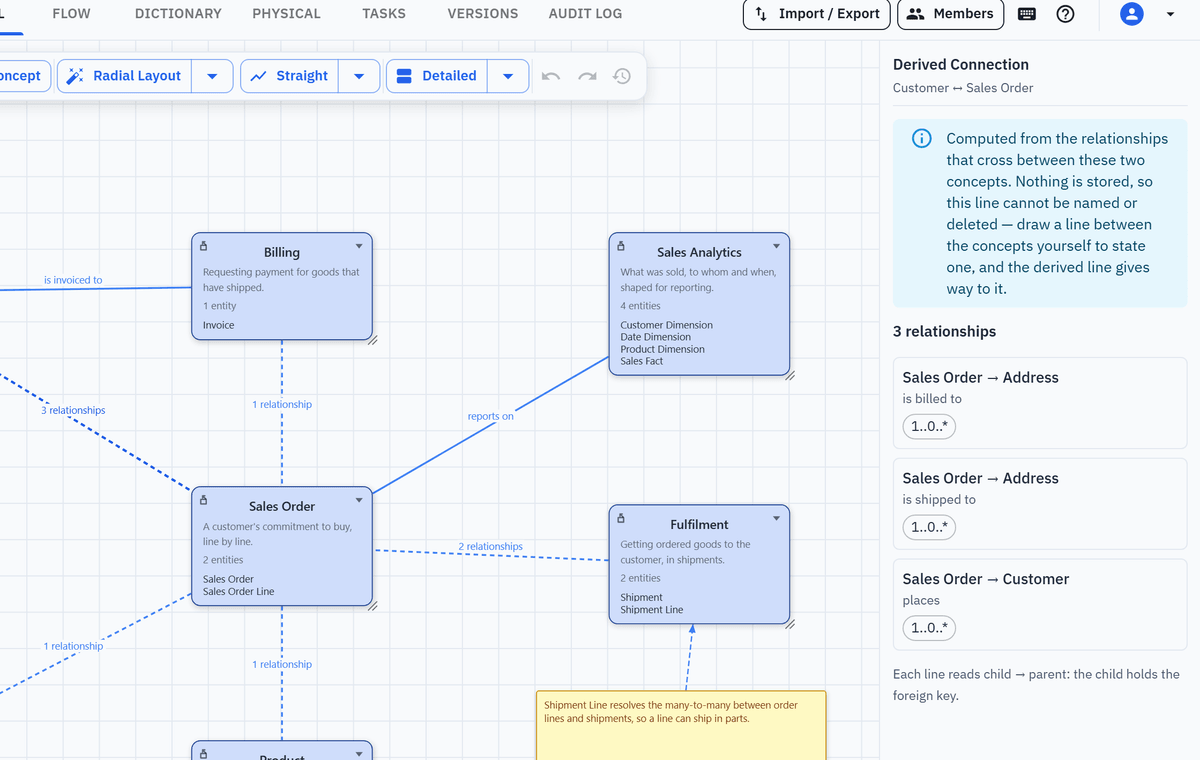
Drag from one concept to another to draw a connection. It is a solid line with a label, such as "is invoiced to", and a definition that says what the statement means. You can draw it before any entities exist, and it takes the place of the dashed derived line for that pair.

  • A label on the line, and a definition in the panel
  • One hand-drawn line per direction for each pair of concepts
  • Waypoints for routing, and a lock of its own while someone edits it
  • No cardinality on the line: the relationships beneath carry it
The hand-drawn connection labelled is invoiced to, selected, with its label and definition shown in the properties panel
Step 3

See the relationships behind every dashed line

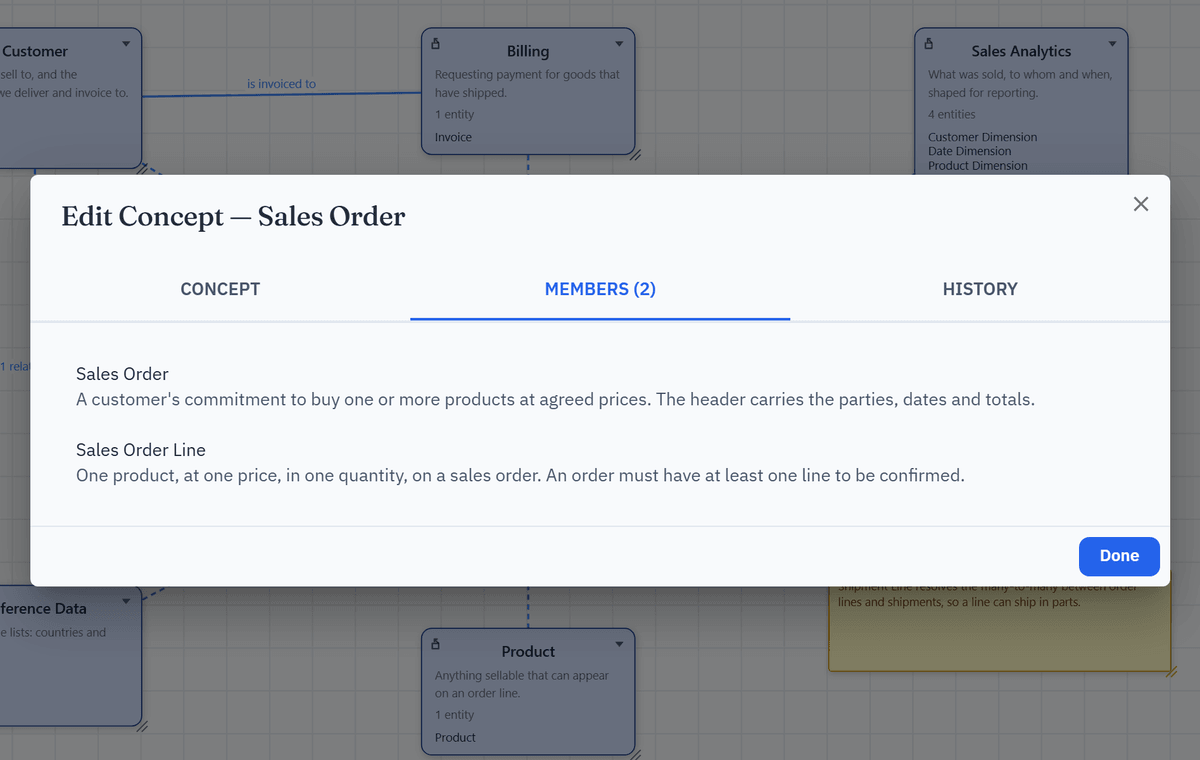
Where relationships cross between two concepts, Model One draws a dashed line labelled with how many there are. Click it to list them, each as child to parent with its cardinality. The line is worked out every time the canvas is drawn, so it always matches the model.

  • Counted from real relationships, never typed by hand
  • Read-only list: child, parent, cardinality and an identifying marker
  • Disappears when the relationships behind it are gone
  • Relationships are changed in the entity editor, not on the line
The dashed line between Customer and Sales Order selected, with a read-only panel listing the three relationships behind it
Step 4

Go from a concept to the entities it covers

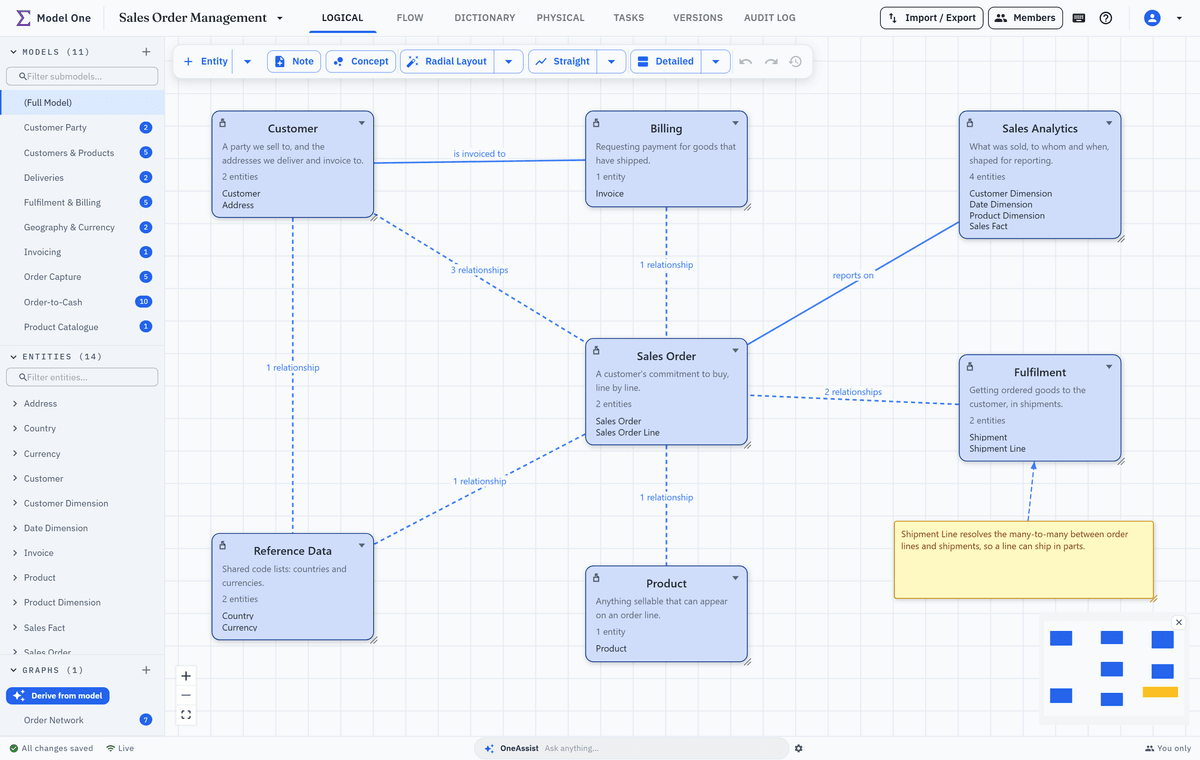
Double-click a concept to open its editor. The Members tab lists the entities it covers and jumps to any of them, straight into the submodel that holds it. A concept can also roll up its child submodels, or leave a branch to a nested concept of its own.

  • Members tab with a jump to each entity
  • Optional roll-up of child submodels, off until you turn it on
  • Nested concepts for a domain and its sub-domains
  • History tab showing who changed what, and when
The Edit Concept dialog for Sales Order on its Members tab, listing the two entities it covers, Sales Order and Sales Order Line, with their definitions
Highlights

Why it works for a warehouse programme

What keeps a concept map useful after the workshop is over.

Concept-first specification

Draw the concepts and their connections before the entities. An unlinked concept is reported for information, not as an error.

One model, not a separate slide

The concept map is drawn from the logical model the engineers build, so there is no second diagram to keep in step.

Lines you can check

Every dashed line lists the relationships behind it. Every solid line is a business statement you label and define.

The dictionary as the vocabulary

Terms and their definitions live in the Data Dictionary, and attributes can link to them, so each definition is written once.

Locks and roles

One person edits a concept at a time and the others see who. Viewers can open and read concepts but not change them.

Audited, versioned, linked to work

Concept changes are in the audit log and in every version snapshot, and a concept can be linked to work items.

Keep exploring

Where the concept map leads

Concepts sit at the start of the pipeline. These pages cover what follows.

Bring a concept workshop to the demo

Tell us the business area. We draw its concept map with you, then show how the entities, loads and SQL follow from it.