Graph modeling

One graph design over the tables you already model

Describe a labelled property graph in terms of your logical model: entities and keys become node types, foreign keys and edge tables become edge types. Take the same design to Microsoft Fabric, Neo4j or a SQL property-graph engine.

Graph model Order Network: node types Customer, Address, Country, SalesOrder, Product, Shipment and Invoice drawn as circles and joined by labelled edge types, with the graph details panel open
Overview

A graph is another view of the same model

It stores bindings into the logical model, not a copy of it.

A graph over relational data always comes down to keys and foreign keys, so Model One builds graphs from them. A node type is an entity, one of its unique keys and the attributes you choose as properties. An edge type is backed by a foreign key, by an associative entity that becomes an edge table with properties of its own, or, for data without declared foreign keys, by columns you name directly.

Because the graph stores bindings rather than a copy, renaming an entity carries through to its node type, and deleting one is reported rather than silently losing the labels and directions you authored. Graphs live in the Logical tab, share its undo history and are included in every version snapshot.

The design is not tied to one graph product. Export writes it as GraphML, as a SQL/PGQ CREATE PROPERTY GRAPH statement, as a Neo4j Cypher script or as a Microsoft Fabric graph model. Every export carries the schema and the mapping to your tables, not your rows: Model One holds no rows, and loading them, where the target needs it, stays with your team.

Mapped edges are off until you switch them on for a graph. With them off, every edge is backed by a declared foreign key. With them on, you are stating that two columns hold matching values: Model One checks that the columns exist and that their datatypes agree, but it cannot check the values.

Walkthrough

From a derived graph to an exportable schema

Three screens from the Order Network graph in a demo order-to-cash project.

Step 1

Start from the model you already have

Derive from model builds a graph for the whole model or one submodel, and asks first what to include: entities become node types, relationships become edges, and junction tables become edge tables. Or start empty and draw it yourself. Positions follow the Logical canvas, so a derived graph opens in an arrangement you recognise.

  • Tick-lists for node types, edges and edge tables before anything is built
  • Junction tables found from their keys, with a treat-as-node-type override where the guess is wrong
  • Focus on one node type's neighbourhood, or on every route between several
  • Routes that pass through one-to-many steps flagged as able to multiply rows
  • A diagnostics band with GRAPH_ rule codes; click a finding to select its object
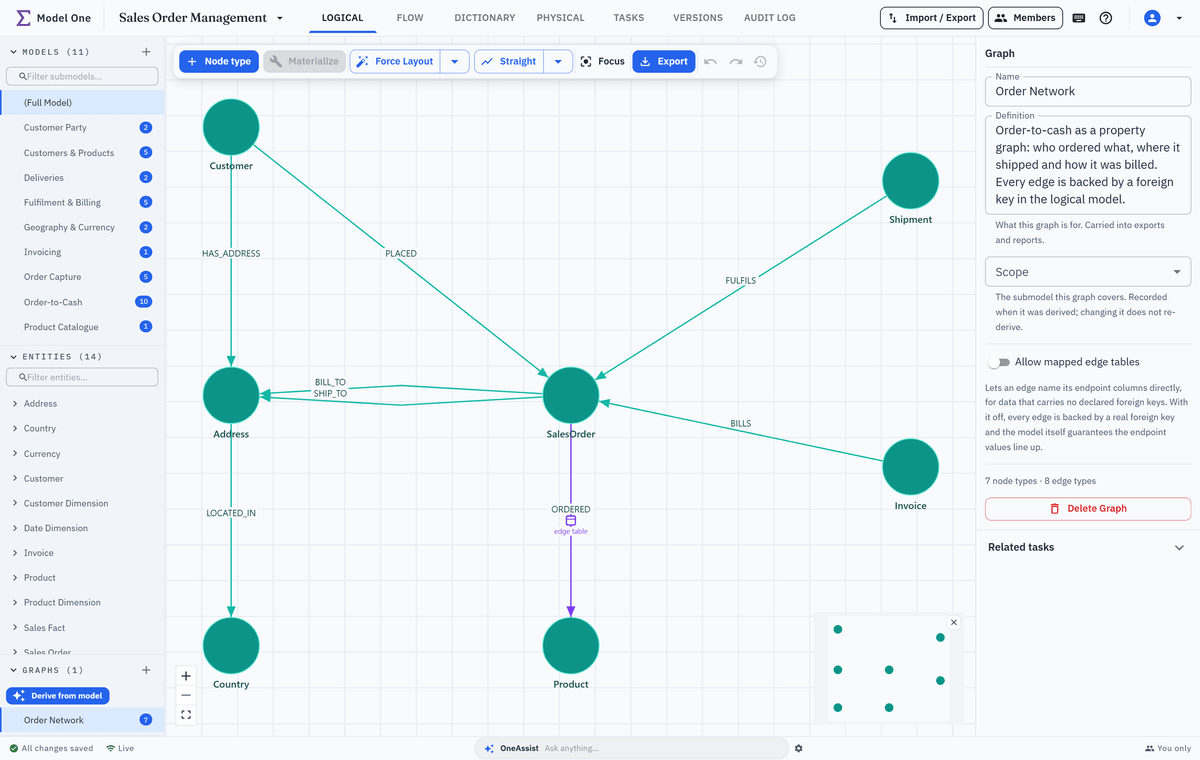
Graph model Order Network: node types drawn as circles and joined by labelled edge types such as PLACED, BILL_TO, SHIP_TO and ORDERED, with the graph details panel open
Step 2

Bind a node type to an entity and its key

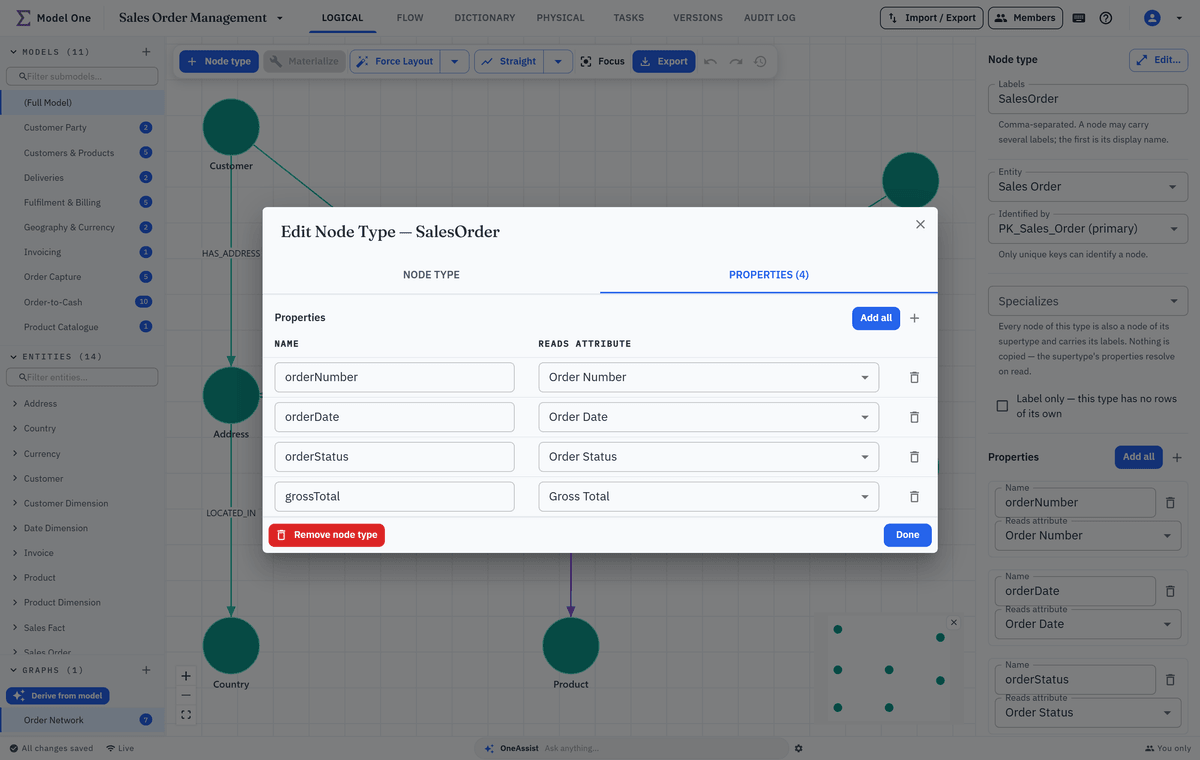
A node type names its labels, the entity behind it, the key that identifies each node and the attributes it carries as properties. Only primary and alternate keys are offered, because a non-unique index cannot identify anything. A node type can also specialise a label-only supertype and inherit its labels and properties.

  • Labels, bound entity and identifying key, in the side panel or the full dialog
  • A properties table, with Add all for the bound entity's attributes
  • Supertypes with inherited properties, drawn with a hollow-triangle line
  • An optional row filter, passed to the target as written
SalesOrder node type: the dialog's Properties tab with four properties, and beside it the panel with its label, the bound Sales Order entity and its primary key
Step 3

Give an edge its own data with an edge table

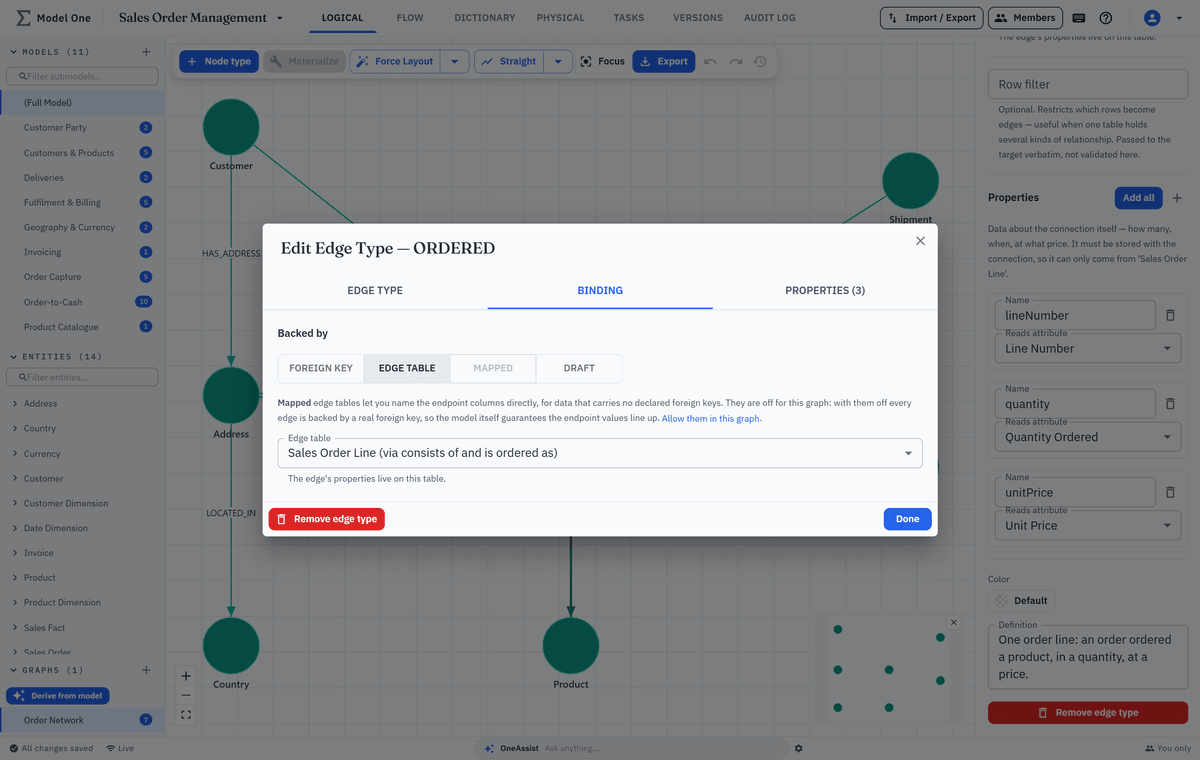
An edge that carries data of its own, such as a quantity or a price, needs a table of its own. Back it with an associative entity that holds a foreign key to each end, and its other attributes become the edge's properties. Where no foreign key is declared, a mapped edge names the endpoint columns directly.

  • Backed by a foreign key, an edge table, mapped columns, or nothing yet as a draft
  • Edges that carry data marked on the canvas with a small table glyph
  • Mapped edges checked for column count and datatypes
  • Edge direction is yours to choose, and Reverse swaps the ends
ORDERED edge type on its Binding tab: backed by the Sales Order Line table through two foreign keys, carrying quantity, unit price and line number
Highlights

What makes it usable on a real model

The parts that matter once a graph grows past a demo.

Sketch first, then Materialize

Draw draft node and edge types in a workshop. Materialize turns them into entities, foreign keys and edge tables in batches, each previewed and snapshotted first.

Four export targets

GraphML, SQL/PGQ, Neo4j Cypher and a Microsoft Fabric graph model. Pick a physical model and the table and column names match its generated DDL.

Lakehouse data without foreign keys

Mapped edges name the columns that join each end, for data whose storage cannot declare foreign keys. They are opt-in per graph.

Focus on large graphs

Dim everything except one node type's neighbourhood, or every route between several. Focus is personal, unsaved and open to Viewers.

Keys and datatypes checked

Diagnostics report missing keys, foreign keys that reference a different key than the node's, and datatype mismatches across an edge, the commonest reason an edge loads nothing.

Edited together, versioned

Selecting a node or edge type locks only that object. Graphs are in every version snapshot and can be linked to work items.

Keep exploring

Where the graph connects

A graph reads the logical model, and on export it can take its names from a physical model.

Put a graph over your warehouse model

Bring a model or a SQL DDL script. We derive a graph from it and export it to the target you use: Fabric, Neo4j, SQL/PGQ or GraphML.